

10. Common problems
WooCommerce (WordPress)
What to check when something does not work the way you expect.
1Red numbers are the steps to take. Each one marks its place in the picture.Grey text explains what you see on the screen.Steps with no number happen outside the picture, on another screen.
10.1 An order was not shipped automatically
5 steps on this screen
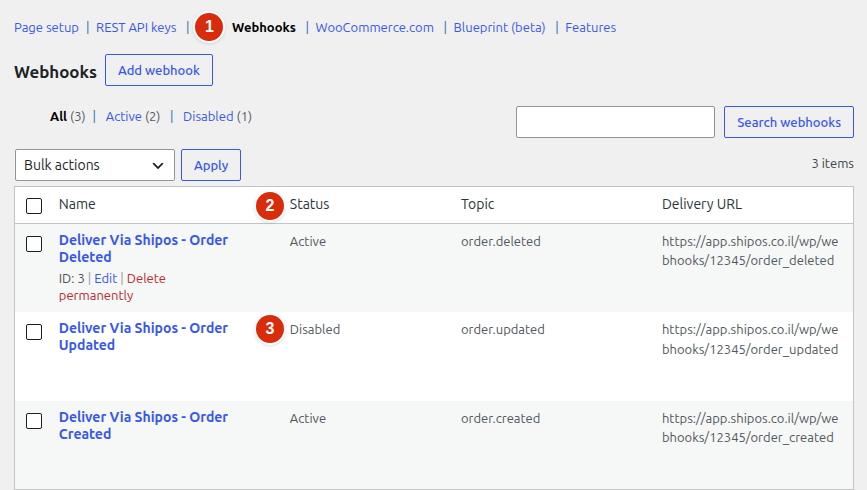
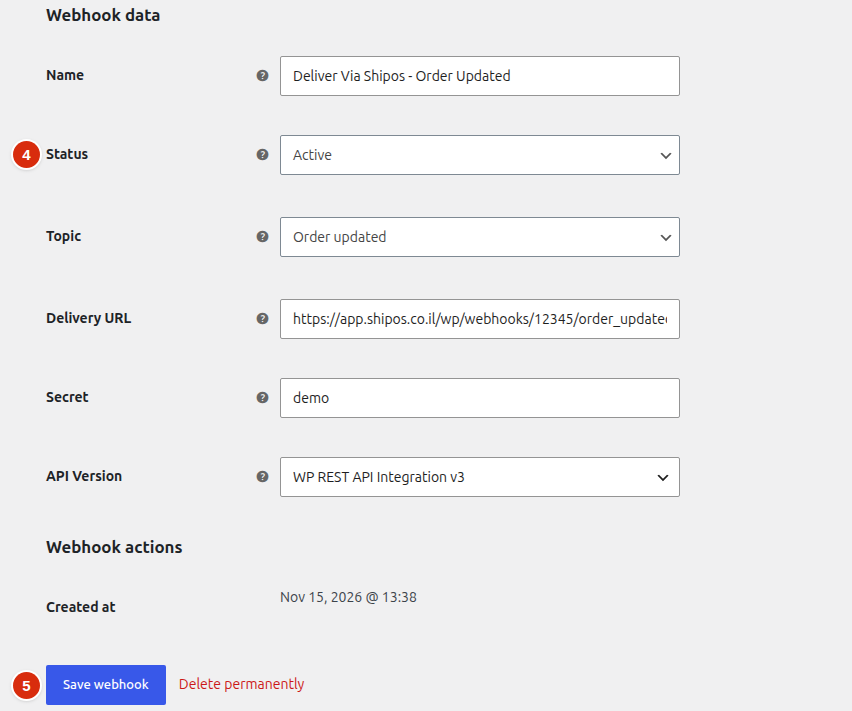
- Automatic shipping sends an order once, when it moves into one of the statuses chosen under Order status for sending shipping automatically. Saving an order that is already in that status does not send it. It skips an order that already has a shipment, one with no shipping method, and one placed before you connected the store. When every order goes to the same shipping company, it also skips Local pickup. If the shipping company refused the shipment, ShipOS does not try again by itself. Send the order yourself: see Send the selected orders.
- None of these? WooCommerce may have stopped telling ShipOS about your orders. Check its webhooks.
- 1In WordPress, go to WooCommerce > Settings > Advanced and click Webhooks.
- 2Check the Status of the three Deliver Via Shipos webhooks: each should read Active.
- 3Click the name of one that reads Disabled.
- 4Under Status, choose Active.
- 5Click Save webhook.
- ShipOS can also switch them back on for you: see Keep your store connected (webhooks).
Good to know
WooCommerce switches a webhook off by itself after several deliveries in a row fail, for example while your site could not reach ShipOS. Orders that changed in the meantime are not sent later on their own, so send those yourself.
10.2 The shipping company rejected the address
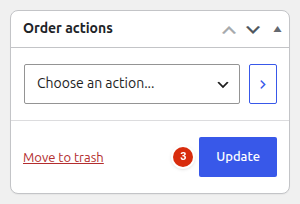
3 steps on this screen
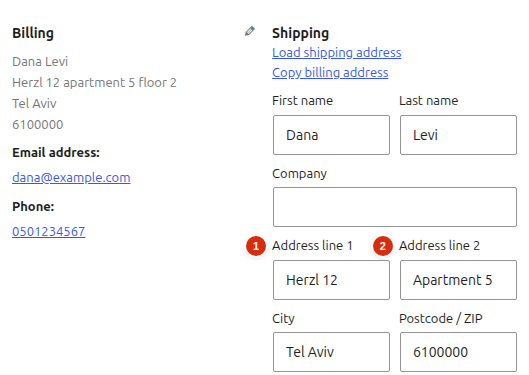
- ShipOS sends the address under Shipping on the order. Correct it there: changing only Billing does not change where the package goes.
- In WordPress, open the order and click the pencil next to Shipping.
- 1Under Address line 1, keep only the street and house number, for example Herzl 12.
- 2Under Address line 2, enter the apartment, for example Apartment 5. Anything else you write there reaches the courier as a note.
- 3Click Update.
- Back in ShipOS, send the order again: see Send the selected orders.
Good to know
A shipping company can reject a street line that holds more than the street and house number, such as an apartment, a floor, an entrance or a postal code, or one with a house number and no street name. You can also correct these details in ShipOS: see Fix an order's delivery details (edit delivery).