

4. Collection and Double delivery
Shopify
Have the shipping company collect an item from the customer, or deliver a new one and collect the old one in one visit, from the order in Shopify.
1Red numbers are the steps to take. Each one marks its place in the picture.Grey text explains what you see on the screen.Steps with no number happen outside the picture, on another screen.
4.1 Send a Collection or Double delivery
3 steps on this screen
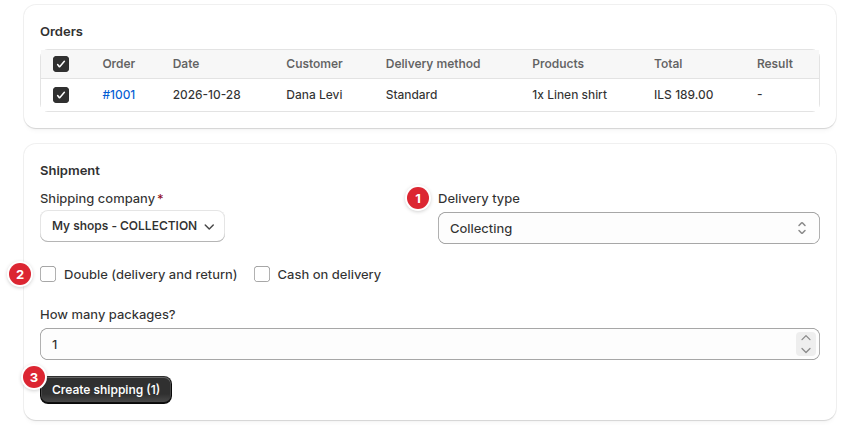
- Open the order in Shopify, then under More actions click Send to Shipos Delivery.
- 1To collect, choose Collecting (the shipping company picks the item up from your customer) under Delivery type.
- 2For a Double delivery, select Double (delivery and return) instead.
- 3Click Create shipping.
Good to know
With Collecting, the shipping company only picks the item up from your customer. With Double, the shipping company delivers the new item and takes the old one back in the same visit. No order behind it? Use Create shipment and choose Collecting, or select Double.