

1. Getting started
Shopify
Sign in, or create your ShipOS account. To open this guide again, click the question mark.
1Red numbers are the steps to take. Each one marks its place in the picture.Grey text explains what you see on the screen.Steps with no number happen outside the picture, on another screen.
1.1 Sign in
3 steps on this screen
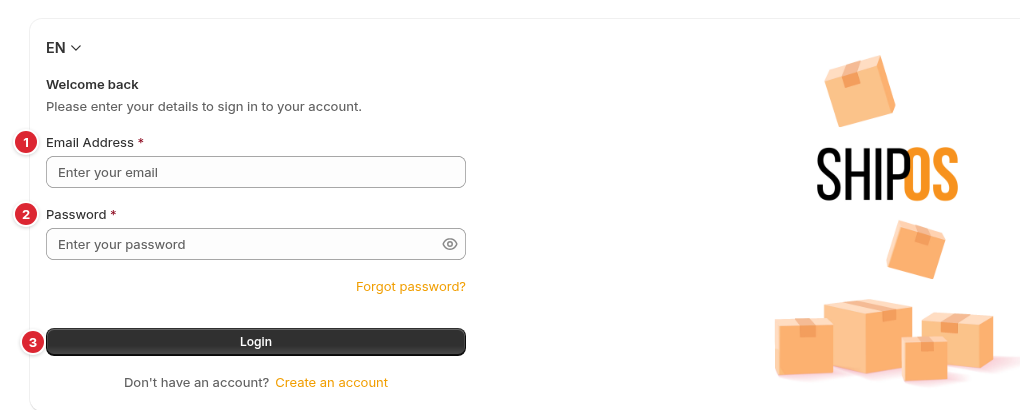
- 1Enter your email under Email Address.
- 2Enter your password under Password.
- 3Click Login.
Good to know
Forgot your password? Click Forgot password? under the password field and set a new one on the page that opens. New to ShipOS? Click Create an account.
1.2 Create an account
9 steps on this screen
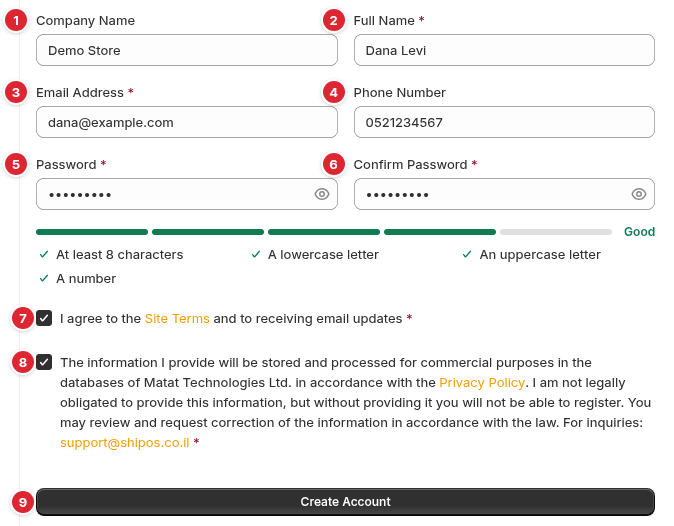
- 1Optionally, add your Company Name.
- 2Enter your name under Full Name.
- 3Enter your email under Email Address.
- 4Optionally, add your Phone Number.
- 5Choose a Password.
- 6Type it again under Confirm Password.
- 7Select the box to accept the terms of use and email updates.
- 8Select the box to agree to the privacy policy.
- 9Click Create Account.
Good to know
Use at least 8 characters, with an uppercase letter, a lowercase letter and a number. The meter under the field shows when the password is strong enough. Phone and company name are optional.
1.3 Verify your email
2 steps on this screen
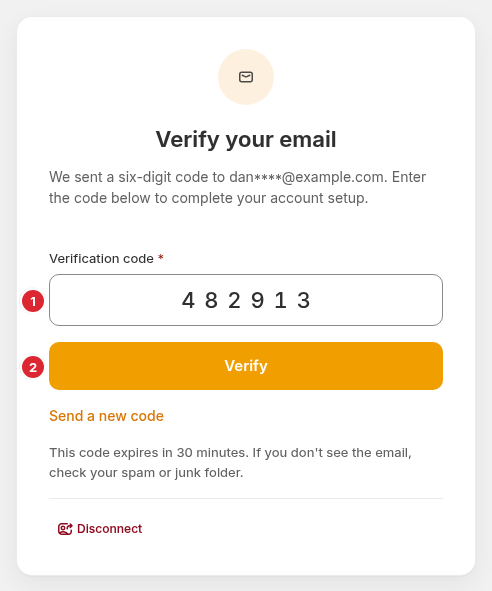
- 1Type the 6-digit code we emailed you.
- 2Click Verify.
Good to know
The code works for 30 minutes. No email? Check your spam folder, or click Send a new code.